How To Score The Sam's Club ASC HEROES ETB + POK BALL TIN Bundle
By the TYPA editorial team · August 18, 2026 · Pokemon Center
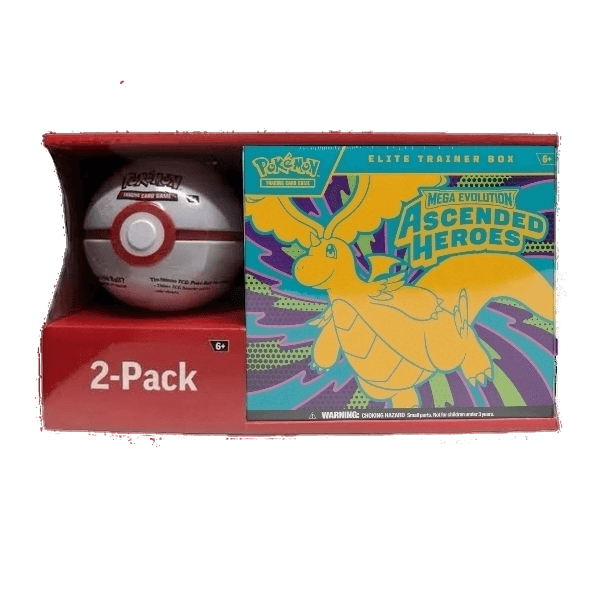
The Pokemon TCG: Mega Evolution—Ascended Heroes Elite Trainer Box + Poke Ball Tin Bundle at Sam’s Club is expected to be a highly sought-after release.
If you're planning to go for this bundle, prepare before it drops. Having your Sam’s Club membership, account, payment information, and TYPA alerts ready ahead of time can give you the best opportunity to secure one when inventory becomes available.
1. Make Sure You Have a Sam’s Club Membership
A Sam’s Club membership is required to purchase members-only products from Sam’s Club.
Don't wait until the product drops to sign up.
Create your Sam’s Club account, purchase your membership, and make sure you're signed in before attempting to secure the bundle.
Save 50% on a Sam’s Club Plus Membership With TYPA
➡️ Sign Up Here: https://goto.samsclub.com/0Gzg1R
If you still need a membership, TYPA can help you save 50% on a Sam’s Club Plus membership.
Check the Sam’s Club membership offer available through TYPA and get your account set up before the drop.
This gives you one less thing to worry about when the product goes live.
2. Prepare Your Sam’s Club Account
Once you have your membership, make sure your account is completely ready for checkout.
Before the drop:
- Sign into your Sam’s Club account
- Confirm your membership is active
- Save or verify your shipping address
- Have your payment method ready
- Make sure you know your account password
- Stay logged in on the device you'll use for the drop
The goal is simple: when TYPA sends an alert, you should be ready to go directly to the product and checkout.
3. Subscribe to the Product-Specific Alert on TYPA
Inside the TYPA App, find the tracker for the Sam’s Club Ascended Heroes ETB + Poke Ball Tin Bundle and subscribe to the product-specific alert.
Product-specific alerts are important because they're designed to notify you about availability for the exact item you're trying to secure.
Make sure push notifications are enabled for TYPA on your phone.
4. Subscribe to the Sam’s Club Hot Product Alert
We also recommend subscribing to the Sam’s Club Hot Product Alert in TYPA.
This gives you another way to stay informed about popular and in-demand products appearing at Sam’s Club.
For the best coverage, we recommend having both alerts enabled:
Having both enabled helps you stay prepared for the target product as well as other important Sam’s Club Pokemon drops and restocks.
5. Act Immediately When TYPA Sends an Alert
If you receive a TYPA notification that the bundle is available, act quickly.
Tap the notification, open the product, add it to your cart, and proceed through checkout as soon as possible.
Popular Pokemon TCG products can attract significant demand, and available inventory may not last long.
Remember: Having an item in your cart does not necessarily mean the product is secured. Complete checkout as quickly as possible.
6. Keep Your Alerts Enabled After the Initial Drop
Don't immediately unsubscribe if you miss the first opportunity.
Sam’s Club inventory can potentially return after an initial sellout. Additional inventory, canceled orders, or subsequent restocks may create another opportunity.
Keep both your product-specific alert and Sam’s Club Hot Product Alert enabled so TYPA can notify you about future availability.
Sam’s Club Drop Checklist
Before the Ascended Heroes bundle drops:
- Have an active Sam’s Club membership
- Use TYPA's offer to save 50% on a Plus membership if you need one
- Sign into your Sam’s Club account
- Confirm your shipping information
- Have your payment method ready
- Download/open the TYPA App
- Subscribe to the product-specific Ascended Heroes alert
- Subscribe to the Sam’s Club Hot Product Alert
- Enable TYPA push notifications
- Keep your phone nearby
- Act immediately when an alert arrives
Be Ready Before the Drop
The worst time to prepare for a competitive Pokemon release is after the product has already gone live.
Get your Sam’s Club membership ready, prepare your account, enable both TYPA alerts, and make sure notifications are turned on beforehand.
Then, when inventory becomes available, TYPA can alert you so you're ready to make your move.
Download the TYPA App and subscribe to the product for the latest restock alerts and notification pings!
Products in this article
Following this drop? See all live Pokemon restocks as TYPA detects them.